📋 Summary
-
The challenge: Translating highly domain-specific, complex user needs into an engaging, modular and flexible component.
-
My role: I was the sole designer and developer on this project, responsible for the entire process; from user research to design and development.
-
The stack: Vanilla JavaScript, Semantic HTML5, CSS, and accessibility-first architecture.
-
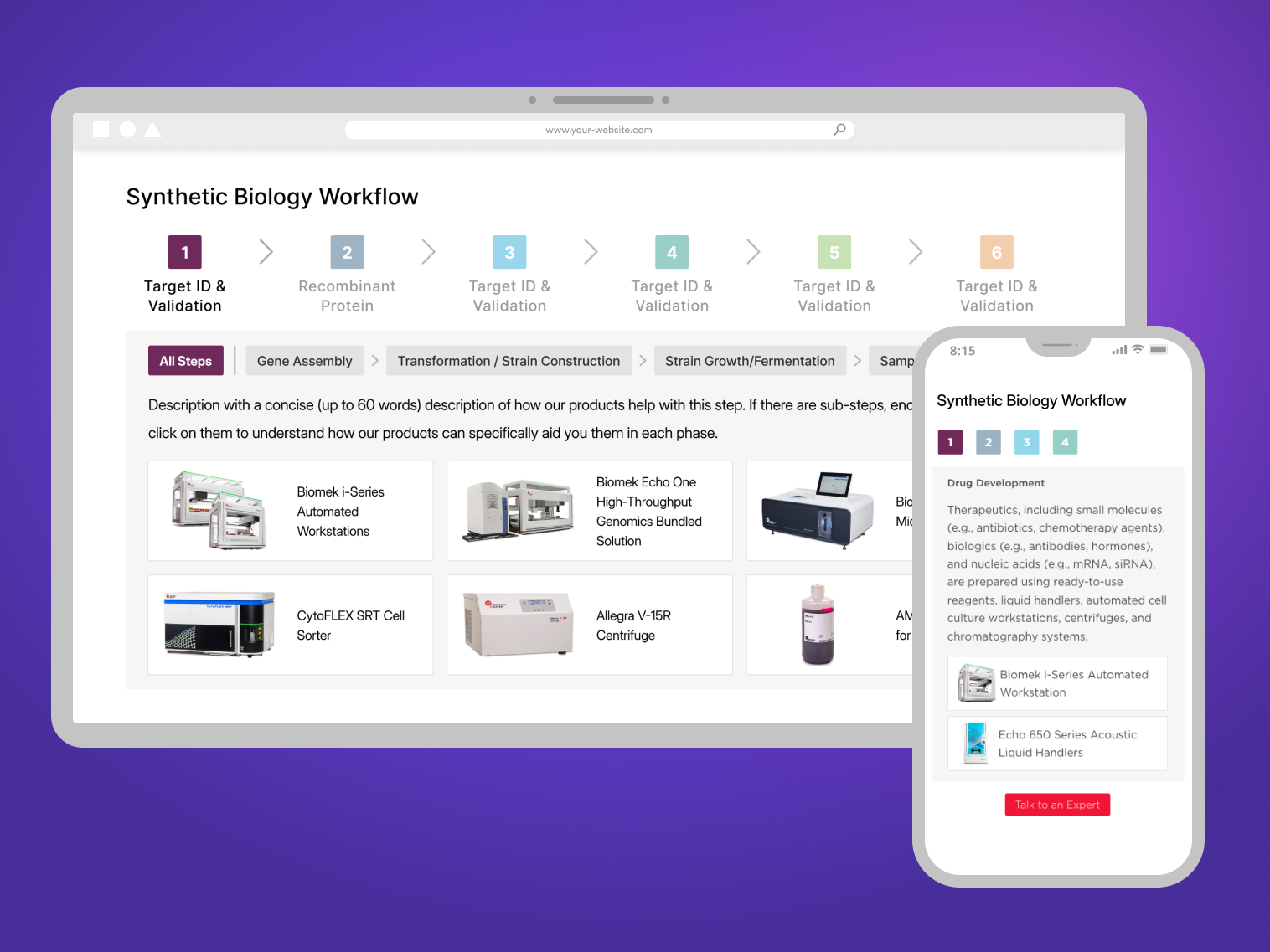
Outcome: Created a re-usable UI component for scientific workflow components, and an internal tool for generating them without coding, now used by Beckman Coulter Life Sciences’ associates globally.
🔍 Background
At Beckman Coulter Life Sciences, scientific workflow diagrams are one of the key elements of our resource pages. They help point customers towards instruments from our portfolio that best match their laboratory needs for certain processes. However, the previous method for building and displaying these workflows was ineffective and technologically stagnant. Digital experience managers (DXMs) had to either:
-
Ask the design department for an image file for the whole workflow, which resulted in a static, non-interactive experience and inaccessible experience, not optimized for search engines.
-
Or build the workflow using code, which was a tedious, manual process that required technical expertise and resulted in inconsistent designs and broken experiences on mobile devices.

An illustration of the process done previously by DXMs, which involved a lot of copy-pasting and manual adjustments.
🎯 The goal
To address the current challenges, I proposed unifying and standardizing our workflow designs. By creating a visual and interaction pattern that is both informative and engaging, I aimed to increase engagement and improve conversion rates by helping users discover relevant products through intuitive workflow navigation.
⚙️ Process
👥 User Research
To make sure the new workflows matched user needs, I interviewed scientists, sales reps, and customer support teams to learn how customers used the workflows and what value they got from them. Because they spoke with customers regularly, I could show them our current workflows and get feedback from the customer perspective. Some had even been customers before joining the company, so they had first-hand experience with the pain points of the previous workflows.
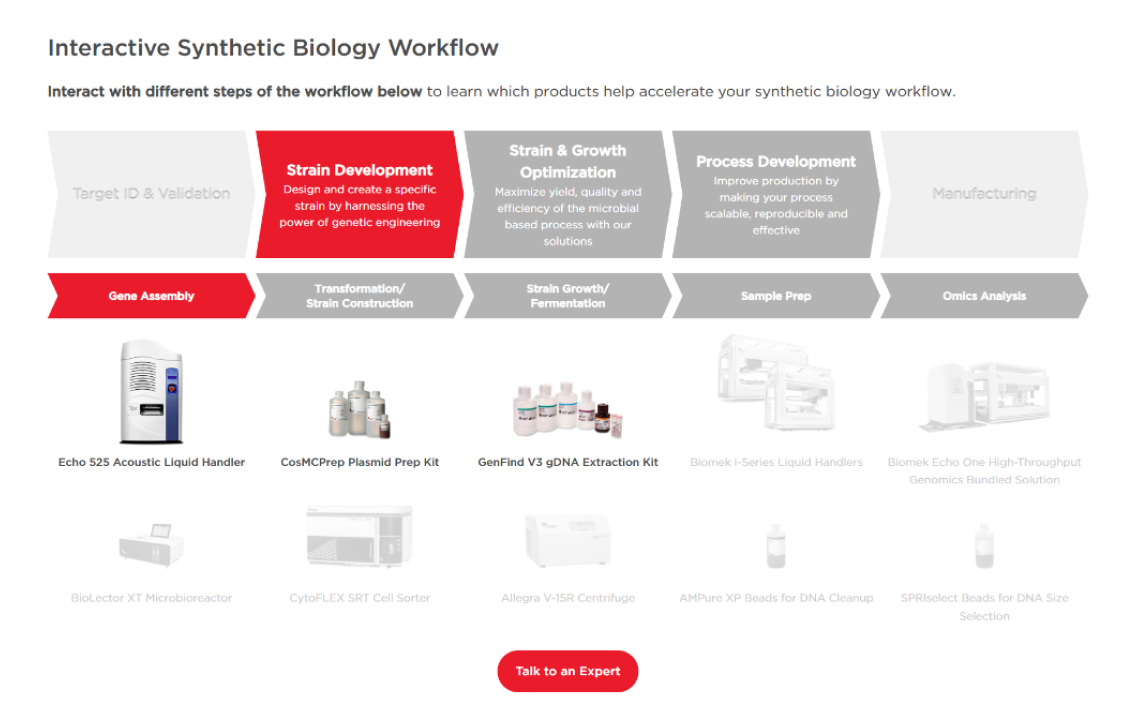
One of our previous workflows, which was shown to stakeholders
The very first time I looked at that workflow, it was maybe a little bit confusing to know that you could interact with it and click on the different steps.
Some of the key pain points identified were:
- Overload of information; all step descriptions and products are shown at once.
- Confusing use of color:
- Grey was used for both “inactive” steps and “active” steps, which created confusion on what the user could click on and what they couldn’t
- Red was overused, which created a sense of alarm/error, required a lot of cognitive effort to process and made the workflow overwhelming to look at
- Not optimized on mobile (user had to scroll horizontally to see the whole workflow)
- Other workflows didn’t follow the same design or interaction patterns
We need more. Something that reads with more energy and what I see with grey and red, is just really, stately and boring. I’m hoping for something that just reads more energetic.
🎨 UI Design
After the research phase, I created a set of requirements for the new workflow component and started to create a mockup on Figma, ensuring it could handle everything from simple 3-step processes to complex, multi-level step laboratory protocols.
I also revamped the visual design, taking into account the profile of our users and the scientific nature of their work. They already spend a lot of time trying to understand complex diagrams and their attention is limited, so the interaction had to be intuitive and clear. I focused on clean visual hierarchy and simplicity, while still using vibrant, harmonious and contrasting colors from our secondary brand colors to attract their eyes and help them navigate the steps.
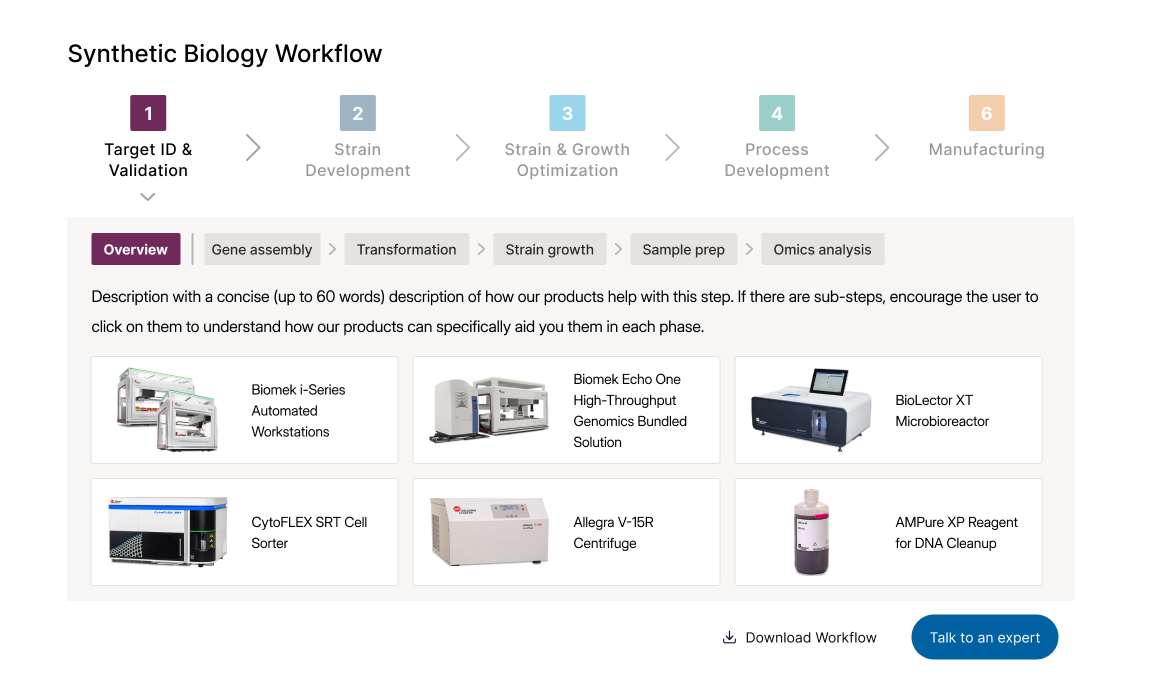
Design mockup of the workflow component
I then created a Figma prototype to test the interaction and responsiveness. I shared the prototype with internal stakeholders and iterated based on their feedback, ensuring that the final design met their needs and expectations.💻 Development
To ensure the component was performant, accessible and scalable, I took it upon myself to develop the workflow component from scratch based on my own Figma design.
I focused on responsiveness, performance, and accessibility. I ensured that the component was fully accessible by implementing semantic HTML and ARIA labels, and making sure that the interactive steps were fully keyboard-navigable.
You can see one of the new workflow components in action here
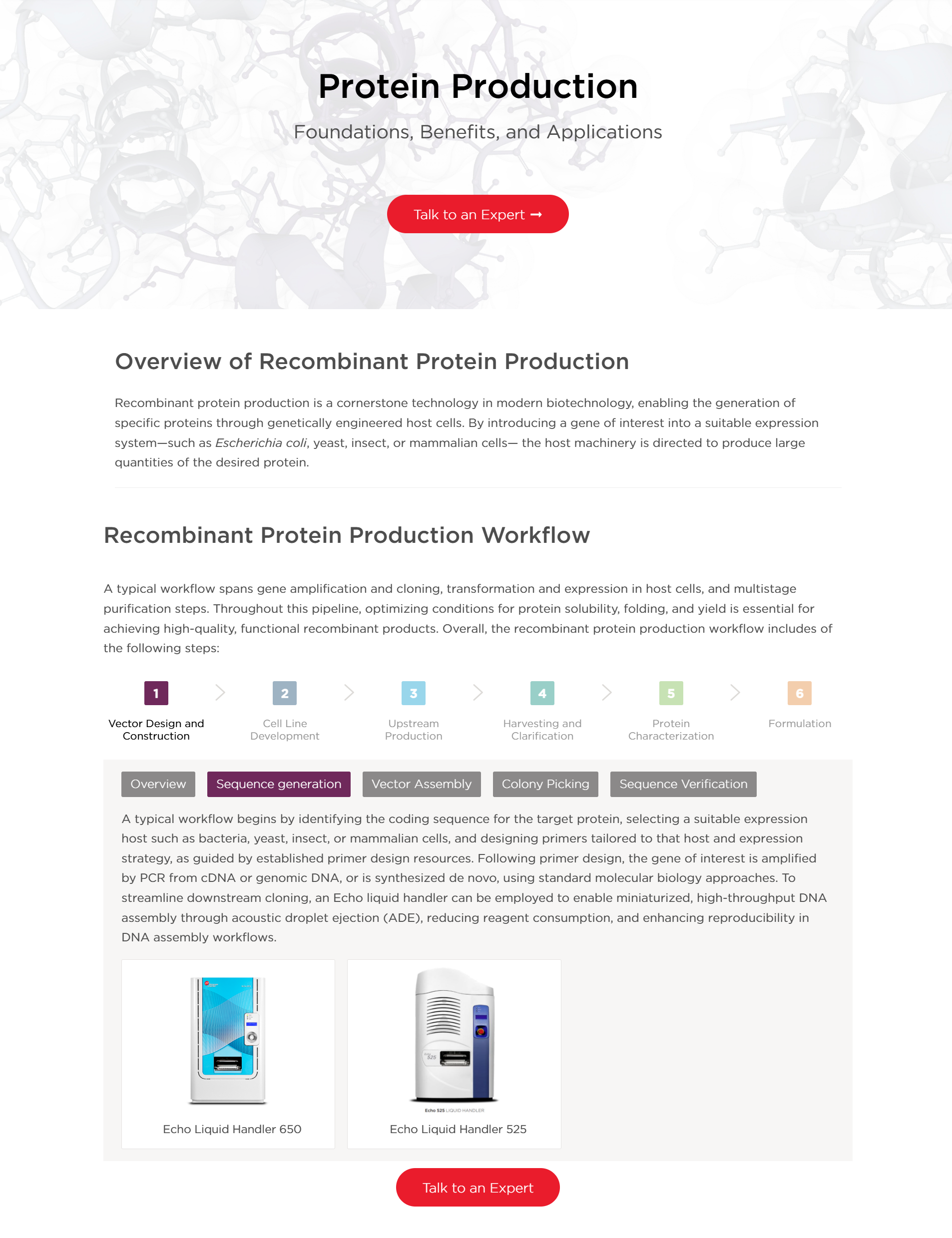
Workflow component in action
🏆 Results
⚠️ What went wrong
After I developed the final workflow, my colleagues in the Digital Experience team were happy with the design and functionality and initially very excited to use it.
However, nobody was actually using my template. Even though the code was written cleanly and in a modular way, it was still a code-based solution, which meant that DXMs would have to copy-paste it and modify the content directly on the code, like with the previous components. This was not sustainable and required technical knowledge, which not all DXMs are supposed to have.
💡 The lightbulb moment
To fix this issue, I decided to develop an internal tool. I was initially unsure how to approach it, since I had never built a tool for generating UI before, but it turned out to be a natural extension of the modular workflow system I had already designed.
I just needed to create a user interface where users could input the content of the workflow (steps, sub-steps, associated products) and integrate it in the code for the workflow component I previously created.
To do this, I leveraged AI coding tools to help me with the development, which allowed me to build it in a fraction of the time it would have taken me otherwise.
🛠️ The Workflow Editor
The “Workflow Editor”, as I creatively named it, is a no-code GUI that allows DXMs to create and customize these workflow components without writing a single line of code, reducing the time to create a workflow from several hours to just a few minutes.
The Workflow Editor is a simple, form-based interface where users enter steps, sub-steps, product links, and images. It outputs a single JSON file containing the workflow content, which colleagues can import into another Workflow Editor to recreate the same component—ensuring consistency and smoother collaboration.
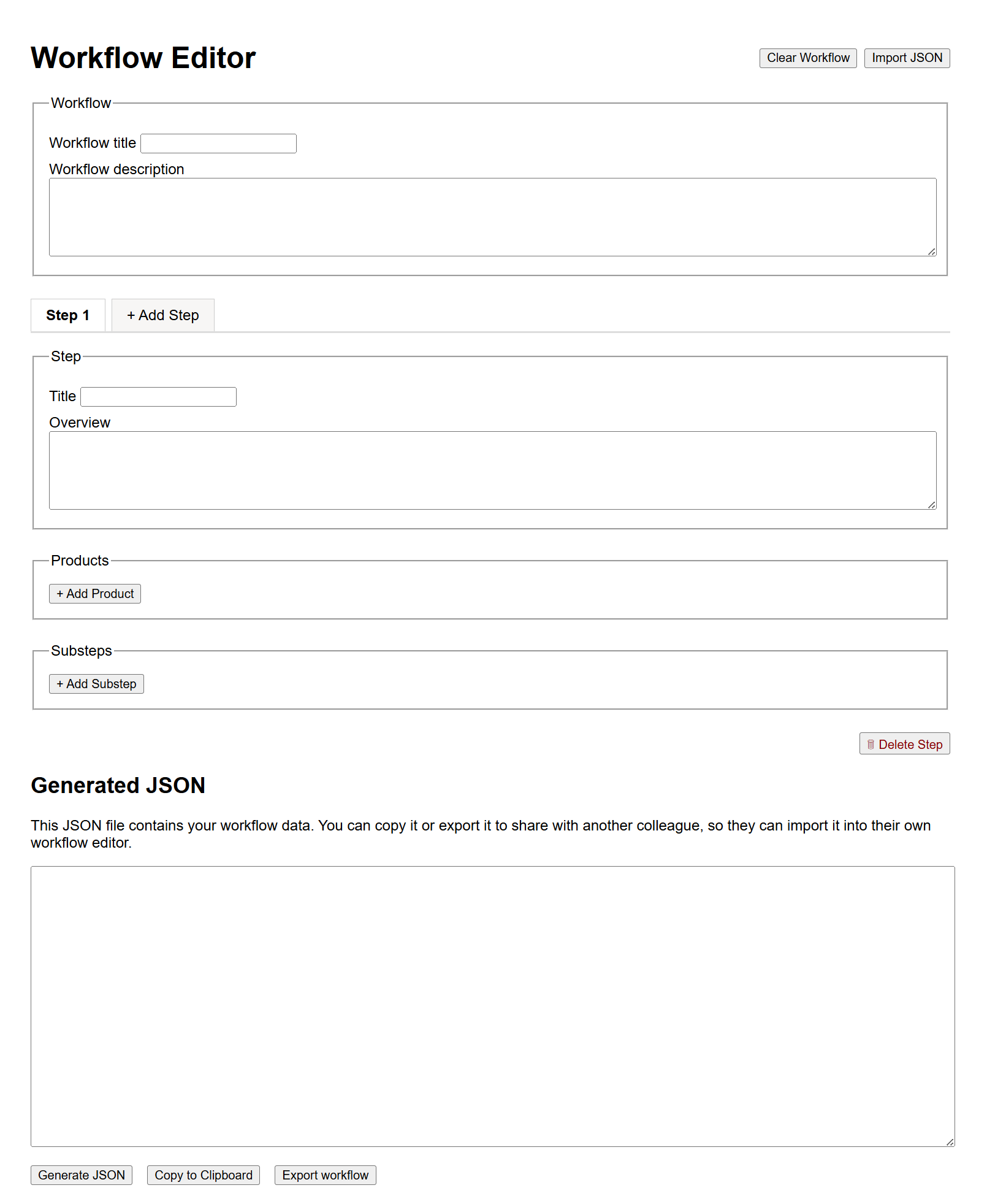
The vibe-coded Workflow Editor
Once the user finishes, the generated JSON can be fed into the script of the workflow component I previously created, and it will render the new content dynamically. The resulting code can be then pasted into the company’s Sitecore CMS to add to the structure of the intended webpage.
This makes publishing faster and easier for DXMs and non-technical colleagues, while ensuring consistent design and behaviour across workflows without sacrificing flexibility.
📈 Impact
Since the implementation of the new workflow component and the Workflow Editor, the project has delivered immediate improvements to our internal development lifecycle and the site’s technical health:
⏱️ Reduction in Time-to-Market
By shifting from manual crafting to the Workflow Editor, the time required to deploy a new scientific workflow was reduced from several hours to under 15 minutes. This allows the Digital Experience team to ship content at scale without relying on frontend engineering support.
🧹 Tech-debt reduction
The new system eliminates the need for copy-pasting code snippets and manual adjustments, which were common sources of errors and inconsistencies.
♿ Guaranteed accessibility & SEO compliance
Before this project, 100% of image-based workflows were invisible to screen readers and search engines. The new system ensures that every workflow shipped is automatically accessible and fully indexable (SEO-friendly) through semantic HTML, regardless of the DXM’s technical background.
🎯 Visual & functional standardization
The component framework enforces brand consistency across all workflow diagrams, making sure users have a cohesive experience and can easily recognize and understand the patterns. This reinforces Beckman Coulter’s professional reputation through high-fidelity UI that doesn’t break when our users interact with it.
🚀 Next steps
🔗 Sitecore integration
The project is currently transitioning to the Global Web Team for full integration into the Sitecore CMS. Because the Workflow Editor already outputs structured JSON that maps directly to the UI component’s properties, the technical handoff is remarkably efficient. I have essentially provided the logic and schema, allowing the Sitecore team to wrap the tool into a native CMS component with less effort.
📊 Performance tracking & analytics
With the standardized component now live, the next phase involves monitoring engagement through Google Tag Manager (GTM). We will specifically track:
-
How many users engage with sub-steps and product cards.
-
Click-through rate (CTR) from workflow steps to the integrated product pages.
💭 My takeaway
This project served as a case study in full-cycle ownership, specifically highlighting the need to pivot when technical friction threatens success. By leveraging AI coding tools, I managed to quickly build an internal solution that ensured the success of the main project, which is something I’m definitely looking forward to doing more in the future.
It also solidified my desire to build developer-centric tools and systems that reduce complexity and empower builders to ship high-quality work.
Overall, I’m proud of the work I did on this project and I´m thankful for my team’s trust and support.